Most AI tools give you
a thread.
Koffein gives you a workspace.
The AI workspace for people with too much going on.
No credit card · Cancel anytime · Up in 30 seconds
Sound familiar?
You have six active projects.
Your AI tool has one thread.
✕You paste the same context into every new chat. Every. Single. Time.
Project Memory injects your context into every chat automatically. The AI knows your company, your constraints, your priorities — without you re-explaining.
✕You have six chats open and no idea which one had the answer.
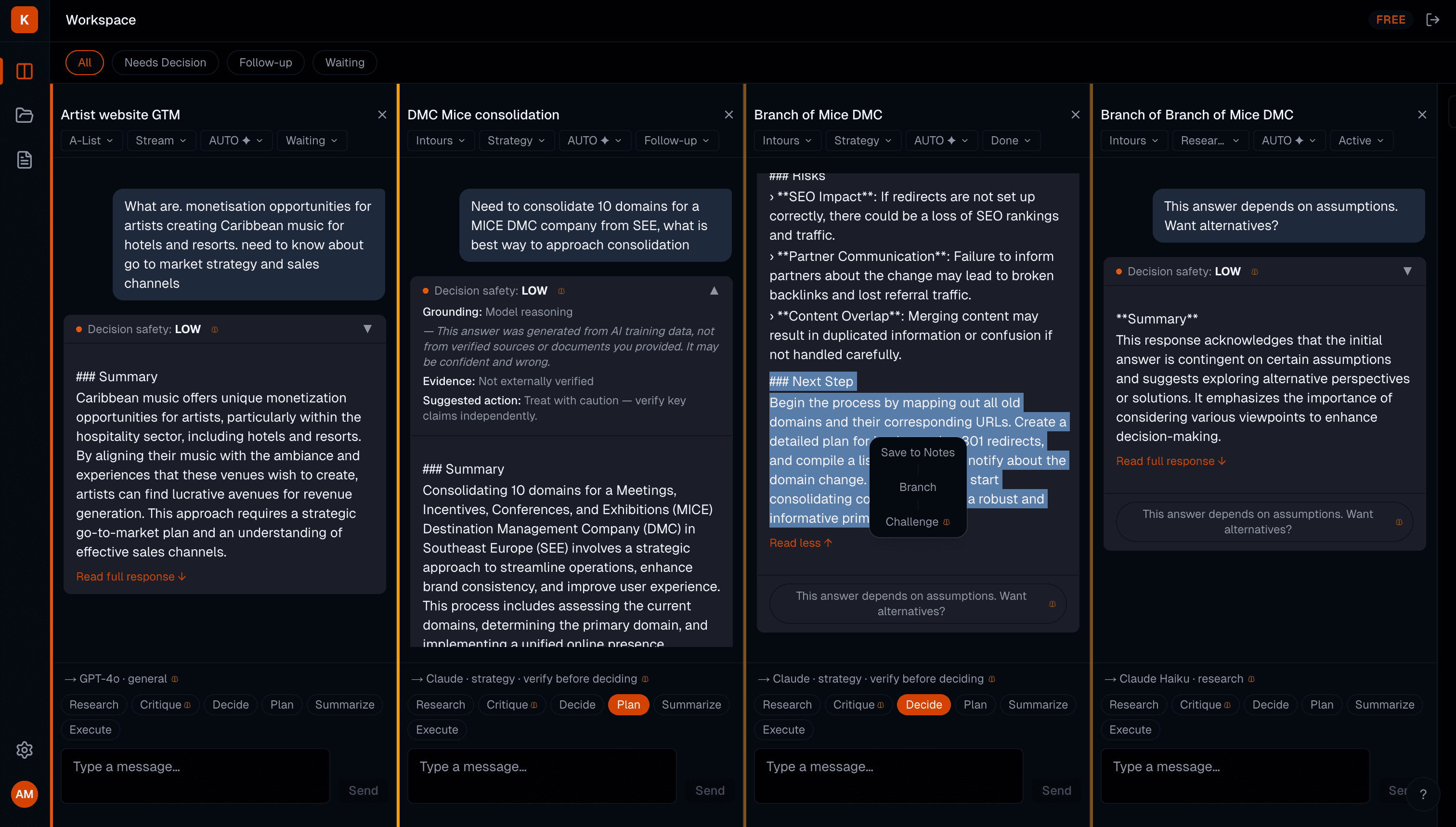
Koffein's multi-column workspace keeps every thread visible, organised by project, scrolling independently — all at once.
✕You scroll through 800 words to find the one line that matters.
Every AI response collapses to 2 lines by default. Scan your entire workspace in seconds. Expand only what earns your attention.
✕You spend more time picking a model than actually using it.
AUTO routing assigns Research → Claude, Technical → GPT-4o, Writing → Claude. You see the routing hint before you send. Override whenever you want.
What's inside
Everything you wish ChatGPT had.
Parallel chats. Project memory. Auto-routing. Collapsed outputs. Built for people who run fast.
Parallel chats, always open
Run your fundraise, your product sprint, and your content calendar simultaneously. Each column is independent — its own model, workstream, project context, and scroll position.
Project memory that actually sticks
Write your context once — who you are, what you're building, what constraints matter. Koffein injects it automatically into every chat in that project. The AI never forgets.
Scan in seconds, not minutes
Every response starts collapsed at 2 lines. Your entire workspace — six threads of thinking — fits on one screen. You decide what deserves a full read.
Smart model routing, no decisions needed
Koffein routes each message to the right model automatically: Claude for strategy and writing, GPT-4o for technical and execution. You see the routing hint. You override when it matters.
Prompt optimization, transparently
Your message is rewritten for the target model before it sends — XML structure for Claude, conversational scaffolding for GPT. You see exactly what changed in the diff.
Branch and Challenge in one click
Select any text in any response. Branch it into a focused new thread. Or hit Challenge — Koffein forces the model to argue against its own answer, surfacing assumptions you'd otherwise miss.
The thinking assistance layer
AI makes you feel certain.
That's the dangerous part.
Research shows people accept AI outputs without scrutiny 73% of the time. AI access inflates confidence by +11.7pp — even when the model is wrong. Koffein is the only AI workspace built with features specifically designed to keep your own brain in the loop.
Decision Safety Badge
Every AI answer is rated LOW, MEDIUM, or HIGH based on workstream, model, and optimization level. Tap to see exactly how the output was grounded — model reasoning, evidence-based, or speculative. Always visible. Never skippable.
73% of AI outputs accepted without scrutiny
Uncertainty Nudge
On Strategy and Fundraising chats, a one-click prompt appears: "This answer depends on assumptions. Want alternatives?" Click it — Koffein opens a branch chat that argues against the original answer.
Deliberation doubles override rates
Your Take field
When you save a note from a chat, you're asked: what do you actually think? One sentence. No formatting. This single habit — writing your own view before accepting an AI answer — is the most effective guard against cognitive surrender.
Writing your view prevents blind adoption
Built for people who run fast
Founders
Run your fundraise, product sprint, and hiring in parallel. Context never resets between sessions.
Consultants
Six clients. Six contexts. Zero re-explaining. Project memory handles it.
Researchers
Branch hypotheses, challenge findings, track evidence. Know when to trust the output.
Operators
GTM, technical, and content — side by side, routed to the right model automatically.
What's coming
Roadmap
Koffein is in active development. Early users shape what ships next.
Live now
Q2 2026
Later
Start free. No card. No catch.
Every plan includes all features. Pay only when you need more messages. No credit card to start.
Free
Explore the workflow
✓ GPT-4o-mini only
✓ 4 projects · 4 parallel chats · 25 notes
✓ Light — enough to evaluate if Koffein fits your work
Pro
Sufficient for serious daily work
Best for: daily AI users running 2+ active projects
✓ All models — GPT-4o, Claude Sonnet, Claude Haiku
✓ Unlimited projects · Unlimited chats · Unlimited notes
✓ Pro — covers a full day of active research and analysis
✓ Full prompt optimization
✓ Project Memory
✓ Routing hints
Expert
For consultants, analysts, and researchers at full capacity
Best for: consultants and analysts billing by the hour
✓ All models
✓ Everything in Pro
✓ Expert — handles high-volume multi-project workdays
Ultra
Cutting-edge models, maximum throughput
Best for: operators who live in AI tools all day
✓ All models including frontier releases
✓ Everything in Expert
✓ Frontier — for operators who live in Koffein all day
| Feature | Free | Pro | Expert | Ultra |
|---|---|---|---|---|
| Models available | Basic | All | All | All + frontier |
| Projects | 4 | Unlimited | Unlimited | Unlimited |
| Parallel chats | 4 | Unlimited | Unlimited | Unlimited |
| Notes | 25 | Unlimited | Unlimited | Unlimited |
| Daily usage | Light | Pro | Expert | Frontier |
| Prompt optimization | Light | Full | Full | Full |
| Project Memory | — | ✓ | ✓ | ✓ |
| Routing hints | — | ✓ | ✓ | ✓ |
| Decision Safety | ✓ | ✓ | ✓ | ✓ |
Teams plan coming Q2 2026 — pooled usage, shared projects, shared notes. Get early access →
73% of people accept AI outputs without question.
Koffein is built so you're not one of them.
Free plan. All features. No credit card. 30 seconds to start.